Google Dataset Search에서 shape을 가져와 모델을 학습시켰습니다.
https://datasetsearch.research.google.com/
Dataset Search
datasetsearch.research.google.com
https://data.mendeley.com/datasets/wzr2yv7r53/1
2D geometric shapes dataset
This dataset is composed of 2D 9 geometric shapes, each shape is drawn randomly on a 200x200 RGB image. During the generation of this dataset, the perimeter and the position of each shape are selected randomly and independently for each image, the rotation
data.mendeley.com
다음은 프로젝트 폴더 구조입니다. 이 구조를 따라 데이터 정리, 모델 학습 및 실시간 분석을 진행할 수 있습니다.
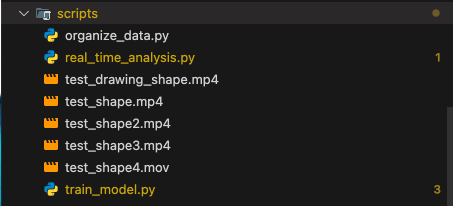
- data/output/: 다운로드한 원본 데이터셋 저장.
- organized_data/: 라벨별로 분류된 이미지 저장 (e.g., circle/, square/ 등).
- models/: 학습된 모델 저장 (e.g., shape_classifier.h5).
- scripts/: 각 작업(데이터 정리, 학습, 분석)을 수행하는 Python 코드. 분석 할 영상 저장
- results/: 결과 파일 저장 (e.g., 분석 결과 CSV 파일).
Step 1: 데이터 정리 (파일 라벨에 따라 분류)
scripts/organize_data.py
import os
import shutil

# 데이터 경로 설정
# '../data/output': 원본 데이터가 있는 디렉토리
# '../organized_data': 정리된 데이터가 저장될 디렉토리
data_dir = "../data/output"
output_dir = "../organized_data"

# 분류할 도형 클래스들의 리스트 정의
# 각 도형의 이름을 소문자로 저장
classes = ["circle", "square", "triangle", "star", "hexagon", "nonagon", "octagon", "pentagon"]

# 각 도형 클래스별로 폴더 생성
for class_name in classes:
    # os.path.join(): 경로를 운영체제에 맞게 결합
    # exist_ok=True: 이미 폴더가 존재해도 에러를 발생시키지 않음
    os.makedirs(os.path.join(output_dir, class_name), exist_ok=True)

# 원본 데이터 디렉토리의 모든 파일을 순회하면서 분류
for file_name in os.listdir(data_dir):
    # 파일 이름에 포함된 도형 이름을 확인하여 해당 폴더로 이동
    # shutil.move(): 파일을 원본 위치에서 대상 위치로 이동

    if "Circle" in file_name:
        # 원본 경로: data_dir/파일명
        # 대상 경로: output_dir/circle/파일명
        shutil.move(os.path.join(data_dir, file_name),
                   os.path.join(output_dir, "circle", file_name))
    elif "Square" in file_name:
        shutil.move(os.path.join(data_dir, file_name),
                   os.path.join(output_dir, "square", file_name))
    elif "Triangle" in file_name:
        shutil.move(os.path.join(data_dir, file_name),
                   os.path.join(output_dir, "triangle", file_name))
    elif "Star" in file_name:
        shutil.move(os.path.join(data_dir, file_name),
                   os.path.join(output_dir, "star", file_name))
    elif "Hexagon" in file_name:
        shutil.move(os.path.join(data_dir, file_name),
                   os.path.join(output_dir, "hexagon", file_name))
    elif "Nonagon" in file_name:
        shutil.move(os.path.join(data_dir, file_name),
                   os.path.join(output_dir, "nonagon", file_name))
    elif "Octagon" in file_name:
        shutil.move(os.path.join(data_dir, file_name),
                   os.path.join(output_dir, "star", file_name))
    elif "Pentagon" in file_name:
        shutil.move(os.path.join(data_dir, file_name),
                   os.path.join(output_dir, "pentagon", file_name))

# 작업 완료 메시지 출력
print("Data organized successfully!")
실행:
# bash

cd backend/scripts
python organize_data.py
Step 2: 모델 학습
scripts/train_model.py
import os
import cv2
import numpy as np
from sklearn.model_selection import train_test_split
from tensorflow.keras.models import Sequential
from tensorflow.keras.layers import Conv2D, MaxPooling2D, Flatten, Dense
from tensorflow.keras.utils import to_categorical

# 데이터 경로
data_dir = "../organized_data"
classes = ["circle", "square", "triangle", "star", "hexagon", "nonagon", "octagon", "pentagon"]

# 데이터 로드 함수
def load_data(data_dir):
    images = []
    labels = []
    for label, class_name in enumerate(classes):
        class_dir = os.path.join(data_dir, class_name)
        for img_name in os.listdir(class_dir):
            img_path = os.path.join(class_dir, img_name)
            img = cv2.imread(img_path)
            img = cv2.resize(img, (128, 128))  # 이미지 크기 조정
            images.append(img)
            labels.append(label)
    return np.array(images), np.array(labels)

# 데이터 로드
images, labels = load_data(data_dir)

# 데이터 정규화 및 라벨 원-핫 인코딩
images = images / 255.0  # 정규화
labels = to_categorical(labels, num_classes=len(classes))

# 데이터 분리 (80% 훈련, 20% 테스트)
x_train, x_test, y_train, y_test = train_test_split(images, labels, test_size=0.2, random_state=42)

# CNN 모델 설계
model = Sequential([
    Conv2D(32, (3, 3), activation='relu', input_shape=(128, 128, 3)),
    MaxPooling2D((2, 2)),
    Conv2D(64, (3, 3), activation='relu'),
    MaxPooling2D((2, 2)),
    Conv2D(128, (3, 3), activation='relu'),
    MaxPooling2D((2, 2)),
    Flatten(),
    Dense(128, activation='relu'),
    Dense(len(classes), activation='softmax')  # 클래스 수만큼 출력
])

# 모델 컴파일
model.compile(optimizer='adam', loss='categorical_crossentropy', metrics=['accuracy'])

# 모델 학습
history = model.fit(x_train, y_train, validation_split=0.2, epochs=10, batch_size=32)

# 모델 저장
model.save("../models/shape_classifier.h5")
print("Model trained and saved successfully!")
실행:
# bash

cd backend/scripts
python train_model.py
Step 3: 실시간 영상 분석
scripts/real_time_analysis.py
import cv2
import numpy as np
from tensorflow.keras.models import load_model

# 학습된 모델 로드
model = load_model("../models/shape_classifier.h5")

# 클래스 이름 정의
classes = ["Circle", "Square", "Triangle", "Star", "Hexagon", "Nonagon", "Octagon", "Pentagon"]

# 실시간 영상 처리 함수
def process_frame(frame, model):
    # 프레임 크기 조정
    img = cv2.resize(frame, (128, 128))
    img = img / 255.0  # 정규화
    img = np.expand_dims(img, axis=0)

    # 모델 추론
    predictions = model.predict(img)
    class_id = np.argmax(predictions)
    confidence = predictions[0][class_id]

    return classes[class_id], confidence

# 카메라 열기
cap = cv2.VideoCapture(0)  # 0번 카메라 사용

while cap.isOpened():
    ret, frame = cap.read()
    if not ret:
        break

    # 프레임 처리
    label, confidence = process_frame(frame, model)

    # 화면에 결과 표시
    text = f"{label} ({confidence*100:.2f}%)"
    cv2.putText(frame, text, (10, 30), cv2.FONT_HERSHEY_SIMPLEX, 1, (0, 255, 0), 2)
    cv2.imshow("Shape Detection", frame)

    # ESC 키를 누르면 종료
    if cv2.waitKey(1) & 0xFF == 27:
        break

cap.release()
cv2.destroyAllWindows()
실행:
python real_time_analysis.py
Result
A4용지에 도형을 그려서 영상으로 찍었더니 도형을 100% 인식했음을 발견.
영상과 도형을 더욱 다양한 방법으로 테스트 해 볼 필요는 있으나, 모델 학습의 첫 시도로는 괜찮았다고 생각한다.

'개발' 카테고리의 다른 글
| [갤럭시 노트 QR] 카메라로 QR 인식했는데 인터넷이 열리는게 아니라 노트가 열렸다??? (0) | 2025.04.10 |
|---|---|
| Microsoft Remote Desktop - 맥북에서 윈도우 원격접속하는 방법 (0) | 2025.01.13 |
| 모바일 크롬에서 console 확인하기 (0) | 2024.12.05 |
| [에러] text/html MIME (0) | 2024.12.03 |
| electron + React + Vite 사용기 (0) | 2024.11.20 |

